work/onepratt
Pratt Institute Student & Staff Portal
Reducing cognitive overload through progressive disclosure
Team
Me
Anisha Vonna
Julie Vo
Avani Chandorkar
my Role
User Research
Interaction and Content Design
Prototyping
Tools
Figma
Figjam
Duration
5 weeks
context
The ask: Redesign OnePratt for the people who use it every day
OnePratt is Pratt Institute's school-wide platform for course registration, admin tasks, and campus services. Matt Martin, Director of Technology Engagement & Outreach, first asked our team to redesign its information architecture with the student experience as the priority.
Why this matters
OnePratt is mandatory, so there's no opting out of a bad experience. For a school that ranks among the top 10 art and design universities in the world (QS Top Universities, 2026), a platform that doesn't match that standard sends the wrong message.
Who we designed for
Primarily students; as the university's core users, their experience carries the most weight. We also included staff opinions to ensure our recommendations reflected how OnePratt is actually used across the community.
design challenge
How might we redesign OnePratt so that students and staff can confidently navigate to and complete their most common tasks?
the solution
Going beyond the brief to create clearer structure, smoother flows, and better guidance
I led redesign for the printing feature. My teammates and I worked collaboratively on the initial research, usability testing, and final deliverables. The information architecture issues were inseparable from the features themselves, so we went beyond the brief to show how both could be redesigned together.
Merged unclear and scattered overview pages into a single, scannable overview


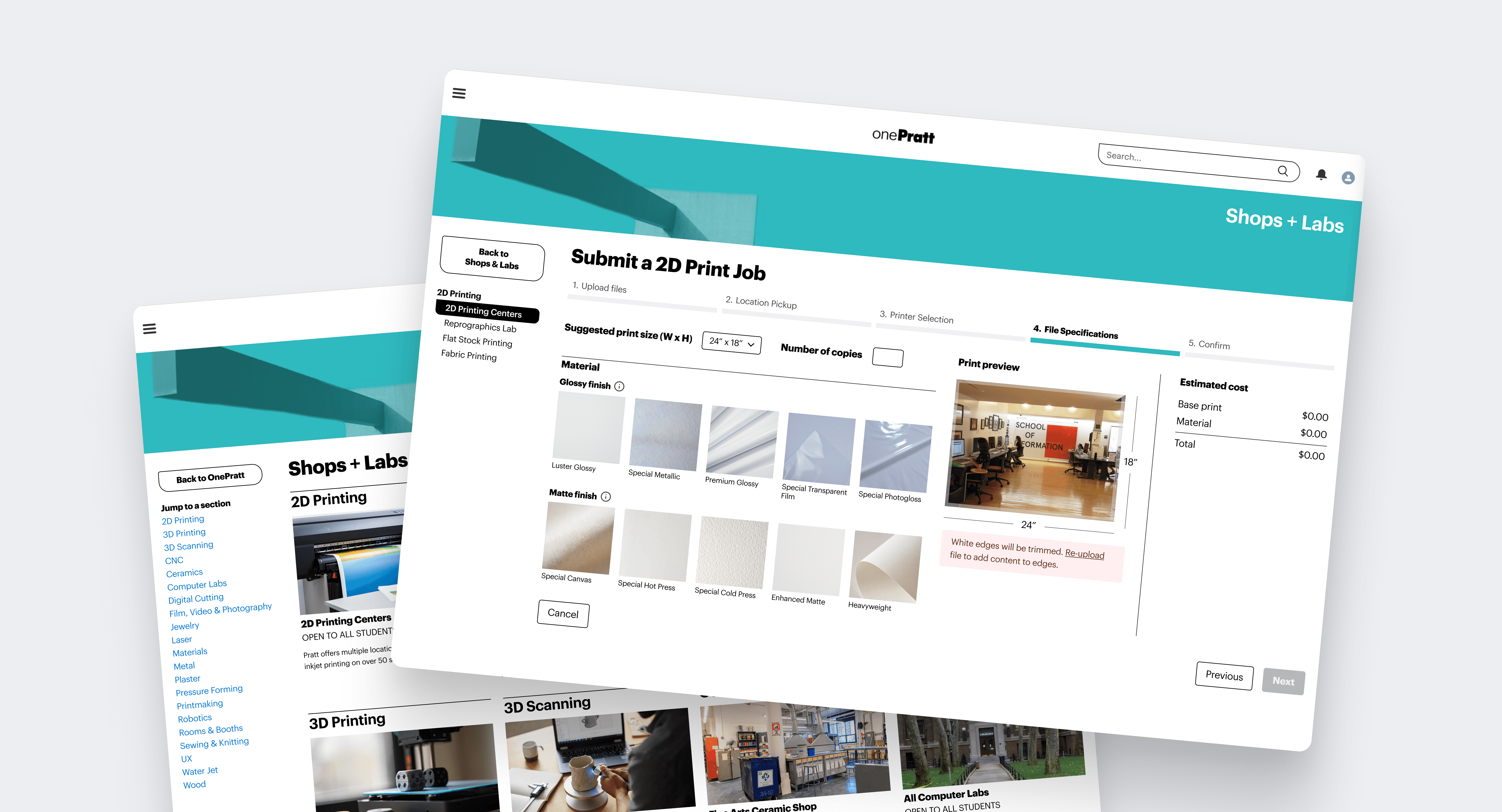
Redesigned the printing submission flow as an interactive, step-by-step experience


Alongside my work, the team addressed three more major areas


impact
Our recommendations are headed into production this summer
The client noted that our work exceeded his expectations, and that we pushed past the initial brief to deliver something more meaningful. Our research and recommendations are now being referenced for implementation.

user research
Scoping up: From IA testing to moderated user testing
Our initial instinct was card sorting and tree testing to tackle navigation and information architecture. But card sorting only addresses top-level navigation, and the problems students had were deeper, in the flows themselves. It also wasn't realistic to group features into shared labels when many of these links are owned by different departments, and function as its own mini-site.
So we pivoted to moderated user testing, with a focus on the features users visited the most.

As current Pratt students ourselves, we had easy access to OnePratt's actual user base. Participants were recruited via the school mailing list and direct outreach, and compensated with a $10 reward. Each interview lasted 30 minutes to an hour.
Students of varying seniority and OnePratt familiarity
We wanted to see if experience with the platform made a meaningful difference. And since OnePratt should be usable for newcomers too, recruiting across year groups felt important.
Staff and admin of across roles
Criteria were kept broad: any kind of staff or admin were welcome. Since the client's primary focus was the student experience, we recruited fewer staff participants overall.
Information overload
Users were overwhelmed across the board: too many icons on the home page, too much text on the printing page. Everything was surfaced at face value with no hierarchy.

Search couldn't compensate
In most products, a strong search feature offsets navigation complexity. On OnePratt, search results either led to the wrong pages or landed users on mini-sites/pages with clarity problems search couldn't solve.

Users needed external help, even to navigate typical tasks
Users relied on memory, bookmarks, or peer help to navigate. For course registration, students needed a slide deck tutorial just to complete the process.

Home page hierarchy
Search results
Academic course registration
2D printing
The first two are foundational to the brief, and the latter two are the most-used features by students. We divided them among ourselves through random selection. I worked on printing.
scope
Why the OnePratt printing feature is a high priority fix
Printing facilities are especially important at art and design schools compared to traditional academic institutions, because they bridge the gap between digital tools and physical production. According to early research conducted by our client about OnePratt:
2D Printing was the 2nd most viewed page on the entire OnePratt platform between March - April 2026, second only to the home page
45% of 111 survey respondents use OnePratt primarily for submitting digital printing requests (2D printing)
findability
Getting to the printing page is harder than it should be
Two entry points into printing caused confusion
Printing was accessible through both Production and Shops + Labs, two pages serving nearly identical purposes.
Users gravitated toward Shops + Labs, but the redundancy created unnecessary ambiguity.

Users typically entered through Shops + Labs, then got lost in a wall of text
Even after finding an entry point, users were overwhelmed by a long, undifferentiated list. 2D Printing was at the top of it, but users still scrolled past it repeatedly.

Combining Production and Shops + Labs into a single page removes the redundancy. The redesign adds images, reduces vertical scroll, and moves hyperlinks to a sidebar for easier scanning.

designing the printing flow
Once the printing page is found, users are still unable to complete the flow
The entire printing flow was spread across six sub-tabs
To properly submit a print job, users had to read through each tab and scroll up and down constantly to cross-reference information.

The text-heavy layout with little user guidance or onboarding caused compounding problems


Rather than presenting all six sub-tabs at once, the redesign surfaces only what’s needed at each step, which reduced cognitive load by eliminating the need to cross-reference between tabs. The redesign strips the home page down to just two primary actions: send a print request, and check your queue position.

Modelling the printing experience off best practices from print-to-pay platforms
Order of the flow matches user mental model
The original flow started with choosing a location, but users expected to upload their file first. The redesign reorders the steps to match that expectation.

Each step narrows down what you see next
Location informs the printer, which informs the material, size, and price of the print. Every previously selected option narrows down what the users sees on the screen.

Make the printing experience foolproof
The original experience offered little transparency. Users couldn't tell if a print job went through, and pricing required guesswork.


iteration
Neutral colours can cause misunderstanding, too
Red isn't the only UI colour with unintended meaning. When I lightly user tested my redesign, the user read the grey FAQ drop-down buttons as disabled, which reminded me that even neutral colours carry associations worth designing around.


reflection
What I learned: Being a user yourself gives you a leg up as a designer
It's easy to identify problems from user testing, but there are countless ways to solve them. Nobody said they wanted progressive disclosure, or images in the printing process.
The decision to reimagine the flow as an interactive, print-to-pay style experience rather than a static cross-referencing sheet came from me being a user too. I've used platforms like that before (cough, see my manga project); I'd want that experience for OnePratt, and that intuition shaped the solution in ways the research alone couldn't have.
what's next
What are the next steps for OnePratt?
User testing the redesign
We tested the original OnePratt with users but ran out of time to formally test the redesign itself. To validate whether the changes actually solve the problems, the next step would be usability testing with around 5 users (Nielsen, 2000).
Follow up with the client!
Since we're returning students, we'll be able to see any design implementations firsthand. We plan to stay in touch and explore how we can continue contributing to the project long term.
