Team
Me (Design)
Amy Chen (Design)
my Role
User Research
Information Architecture
Interaction and Content Design
Prototyping
Tools
Figma
Figjam
Lottielab
Duration
3 months
context
Desktop-first redesign for early-career banking users
When I opened my first Bank of America (BofA) account as an international student, I couldn't find autopay settings or understand the overall navigation. Like me, 2024 study found 25% of banking users cite navigation as a primary frustration (MeasuringU, 2024)—and BofA users specifically reported confusion around payment flows and scattered features.
Why this matters
BofA is often people's first bank, accessible to international students and adolescents. When first-time users encounter confusing interfaces, they develop lower confidence in digital banking.
Who we designed for
Early-career students and professionals (ages 20s). Young users go through more life stages—first jobs, mortgages, investments—so capturing them early = long-term value.
Design Challenge
How might we redesign BofA so first-time banking users can complete critical tasks without getting lost?
the solution
Four improvements addressing task clarity, discoverability, and trust
I led design for Transfer & Pay flows, Spending & Budgeting, Rewards & Deals, and Intelligent Search. My teammate and I worked collaboratively on the initial research, card sorting, tree testing, and brainstorming for lo-fi wireframes.
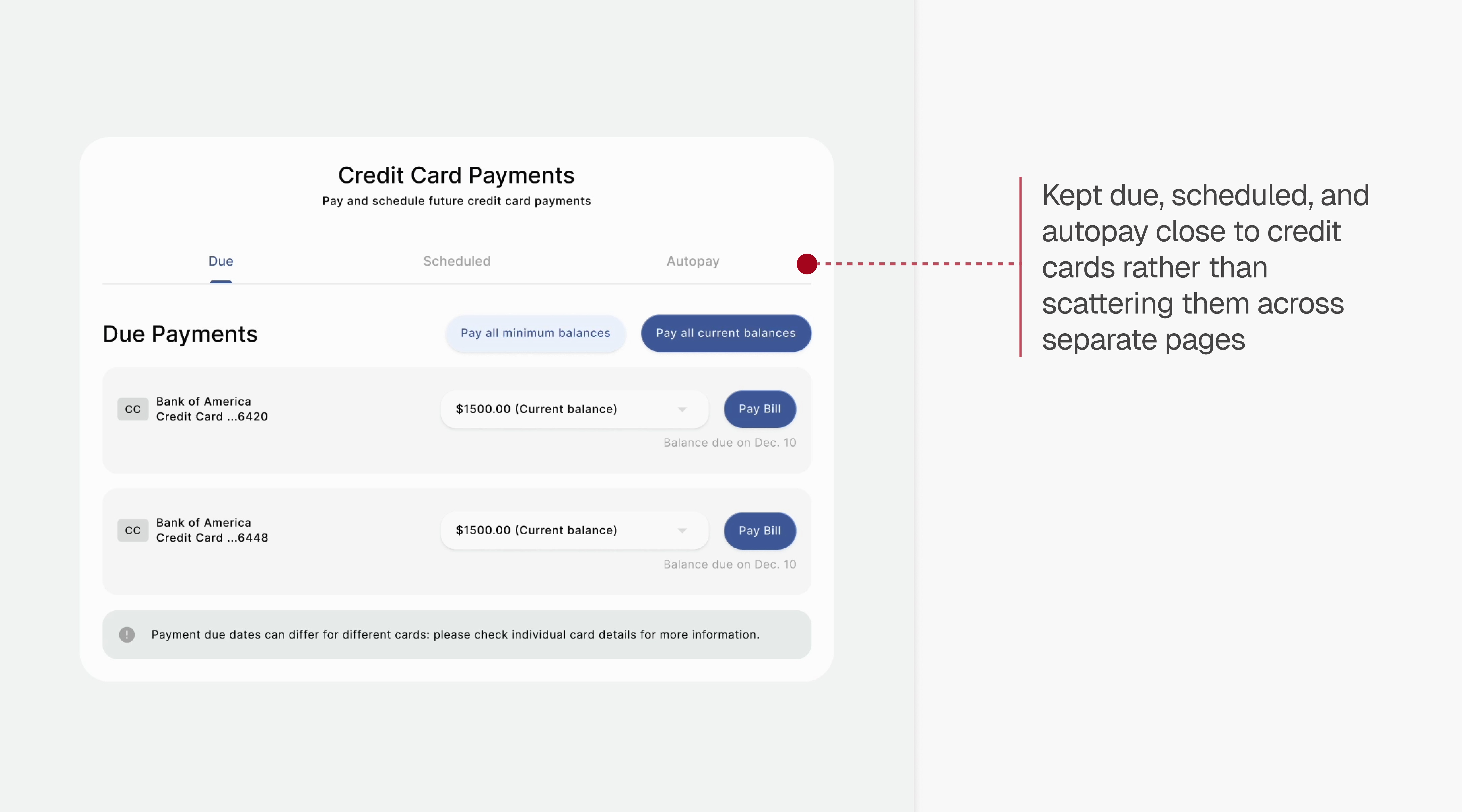
Reorganized credit card payment flow with 'due', 'scheduled', and 'autopay' tabs

Made transfer & pay actions explicit with dedicated cards


Promoted and consolidated related features to primary navigation


Revamped design system with Google's Material Design 3


impact
90% of users said the redesign made banking feel clearer, easier, and more enjoyable
When I tested the hi-fi prototype with 5 users, they completed payment and budgeting tasks more confidently in comparison to their current experience with the BofA interface.
Beyond BofA, this project demonstrates how legacy banking interfaces accumulate features that get buried over time. The consolidation strategy - surfacing rewards, spending tracking, and payment options from nested pages while maintaining clear task separation - could serve as a model for how established institutions balance feature richness with beginner-friendly design.
user research
Users couldn't complete tasks or find features
We conducted semi-structured interviews with 5 students and young professionals to get a sense of their feelings toward the BofA banking experience, and two main complaints kept resurfacing.
Multi-step processes felt "clunky"
Users found multi-step processes confusing. Setting up autopay was "clunky," applications had "unclear steps." Financial tasks need explicit requirements upfront and plain-language instructions.
Cluttered navigation with scattered content
Related features were fragmented across pages. Users described the homepage as 'overwhelming' with too many links. Navigation should reflect how users think about tasks, not internal org structure.
ia validation
Testing information architecture to solve findability problems
Since users consistently felt lost, we tested the information architecture (IA) to see if it was actually broken. Card sorting (7 users) and tree testing (16 users, 11 tasks) showed the general structure of BofA's website worked, with one exception.
A third of participants mixed up transaction history, spending tracker, and monthly statements—when they got one wrong, it was almost always confused with one of the other two in this trio. I took this as not an IA problem, but rather a fundamental misunderstanding of what a feature does.
With 70% correctly navigating the IA, we focused on visual clarity over restructuring.
Transaction history on homepage
To clarify the difference between these three features, we visibly surfaced transaction history—the most-visited feature (6 of 7 users)—on the homepage, framing it as a simple list rather than an analysis tool.

Conversational search as backup
For people who are still confused, as well as the for the 43% who prefer search-first interactions (Gill, 2025), I designed a conversational intelligent search. One tester noted BofA's current search "wasted his time" with FAQ articles, so this approach should guide users directly to relevant tools.

designing for usability
Testing revealed when to consolidate and separate content
Users wanted quick access to deals, but BofA scattered them across 5 navigation links leading to 3 different pages. I consolidated everything into one dashboard instead.

I separated two distinct tasks: checking reward balances (quick cards at top) and browsing available deals (filterable section below). This lets users quickly see what they've earned, then explore new offers without the summary cluttering the browsing experience.

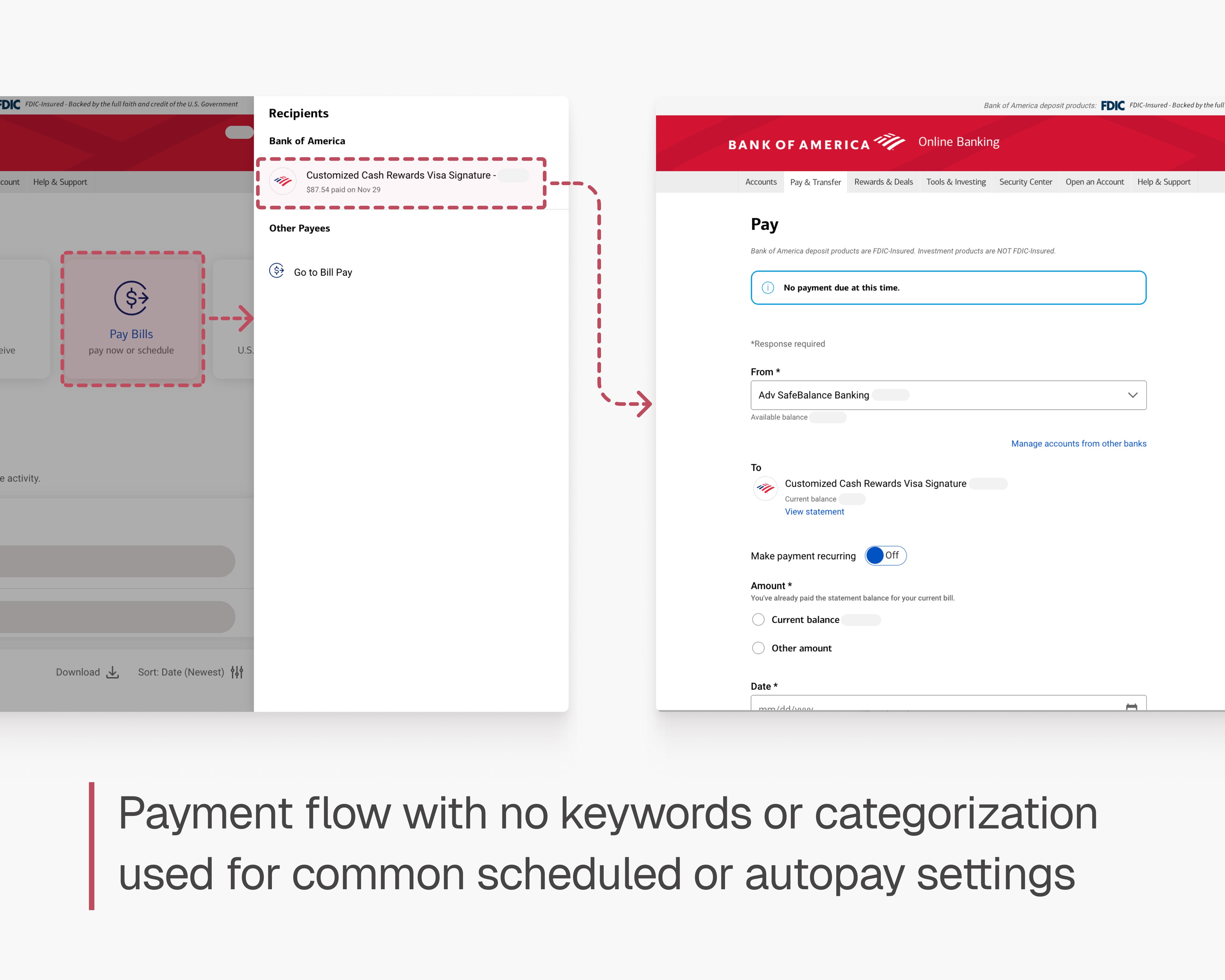
Transfer & Pay was one of the most common banking tasks for our target users, so I prioritized this flow and iterated through multiple rounds of testing. Users struggled to understand whether they should use “Transfer,” “Pay Bills,” or another entry point. Key features like scheduled payments and autopay were buried, causing confusion and misnavigation — and overall, users were frustrated by how many pages they had to click through just to find what they needed.

Starting with the consolidated transfer & pay dashboard
Too many clicks was a universal complaint in our research, so I brought the same consolidation approach here. I designed a unified payment dashboard… but this is where I learned consolidation has its limits:
"I thought this would be faster, but now I have to look through everything to find the one thing I need." - User feedback
The problem: Too many actions on one page created cognitive overload. When users already knew what they wanted to do, they needed a focused flow - not every possible option.

After testing 4 variations of the previous approach, I realized consolidation was the wrong approach here - users needed explicit task separation. Users rarely need to handle transfers, bill payments, AND credit card payments in one session. They needed clarity over consolidation - even if it meant more clicks.
Dedicated hub page with clear task-based entry points
Separated credit card payments, transfers bill pay, and Zelle into their own pages - so when a user enters the flow, that's all they do.

Credit card payment flow with separated parts
Once you're in the credit card flow, it's separated into due, scheduled, and autopay sections - clearly labeled to improve findability and relationship between card settings and paying for your card.
design system
Material Design 3 as a base, with colour modifications
We started with Material Design 3 and adapted it to feel calmer while staying aligned with BofA’s brand. Colours, spacing, corner radius, and typography were adjusted to create a more consistent UI across flows.
Design system tokens and variables
We used tokens and colour variables to quickly test different visual directions, making it easy to update designs in one place while keeping buttons and surfaces consistent.

Colour application logic
User feedback showed red increased anxiety despite it being BofA's primary brand colour, so I suggested we keep it mainly for navigation. Blue and grey were used for actions and content to reduce visual stress while keeping important actions clear.

reflection
What I learned: Fewer clicks doesn’t always mean better usability
Users initially asked for fewer clicks and pages, feeling overwhelmed by the existing flow. But when I introduced progressive disclosure—breaking actions into clearer steps—users felt more confident navigating payments, even though the flow technically had more interactions.
This showed me that perceived friction often comes from information density, not step count. Through testing, I learned the value of validating user feedback through design experiments rather than taking requests at face value.
what's next
What would I build next if I had more time?
Mobile adaptation
We focused on the desktop website because nearly half of banking traffic (50.6%) still comes from desktop (Contentsquare, 2024), with tasks like bill payments actually preferred on desktop over mobile (Hrubenja, 2024). But 54% of users prefer mobile for day-to-day banking (America Bankers Association, 2025), so I'd want to evaluate BofA's current app and determine which features make sense on mobile versus desktop.
Help and support features
Throughout our initial interviews, users mentioned not only their problems with the website navigation itself, but with the customer service models. Since 88% of banking customers say customer experience matters as much as the actual products (Fico, 2025), a comprehensive help system is needed.